
Location-Based Punch Lists: The Faster Path to Closeout
On every roadway project, the punch list decides how fast you close out and how fast you get paid. Yet for many teams, punch lists still run on handwritten notes, a camera roll full of photos that all look the same, and location descriptions like “guardrail past the bridge, left side.” Every vague item means a crew hunting for lath, a call back to the office, and another trip through an active work zone.
OnStation flips that script.
With live station and offset readings pulled directly from project CAD files, every punch list item is marked with a digital flag at its exact location, stamped with station, date, and time, and tracked from Needs Attention to Complete and Verified. By tying documentation to a precise location, digital stationing takes the guesswork out of closeout.
Where Punch Lists Lose Time and Money
Most punch lists don’t stall because of the work itself. They stall because of the gaps around the process.
Location: “I think it’s around here.” A punch list item is only as useful as its location. When that location is a description or a faded stake, the crew sent to fix it spends the first part of the job just finding it. Manual markers get knocked over, buried, or fade, and the punch list inherits every one of those problems.
Documentation: pieced together after the fact. Photos live on one person’s phone, notes are in a notebook, and the plan sheet is in the truck. By the end of the day, the photos blur together and matching a picture to a station becomes a guessing game. Guessing is how you end up with disputes, rework, and questions about whether the work was actually done.
Communication: done but not verified. The contractor finishes an item, but the inspector doesn’t find out until the next site visit or the next phone call. Items sit in limbo while closeout and final payment wait.
Unproven work can mean partial payment or no payment at all. Based on correction cost sheets from several state DOTs, failed lift events caused by missing QC/QA documentation or incorrect location references can cost $5,000–$15,000 each. A punch list that can’t show what was done, where, and when contributes to that cost.
Step 1: Flag Each Item Where You’re Standing
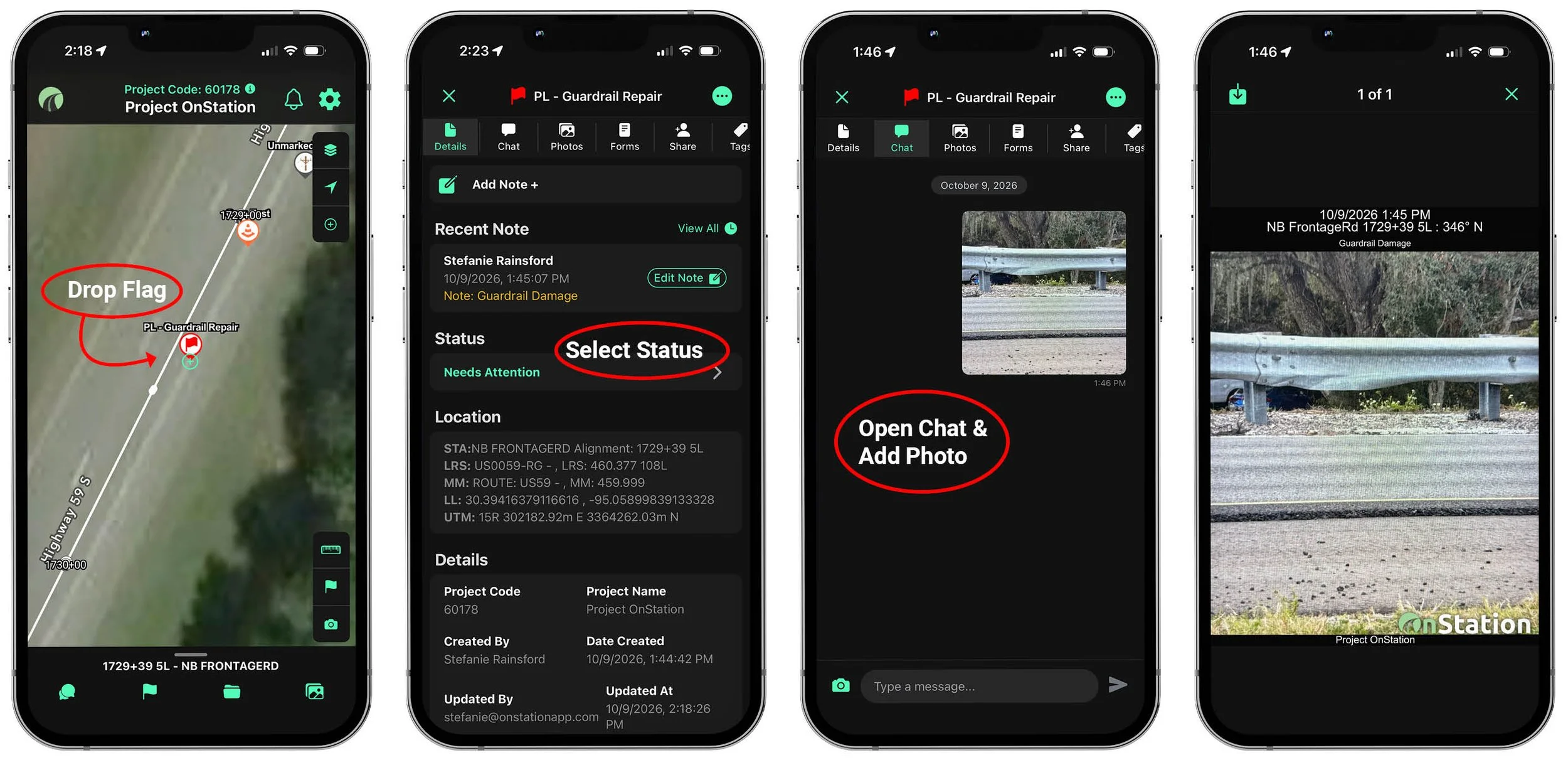
With OnStation, a punch list item starts where it belongs: at its exact location on the project. Walk the job with the app open and your live station and offset are right on your phone alongside the CAD files. When you find something that needs attention, drop the punch list flag right where you’re standing. You can even start documenting punch list items during construction. There’s no need to wait until everyone is available to walk the project together.
That flag is automatically stamped with station, offset, date, and time. No hunting for lath, no pacing off distances, and no writing stations down by hand.
Then document the work needed. Attach photos of the issue and add notes describing what needs to be done. The location, the photos, and the notes live together in one record instead of across a phone, a notebook, and a plan sheet. Read more about OnStation’s location-based documentation.
Status Flags: Know Where Every Item Stands
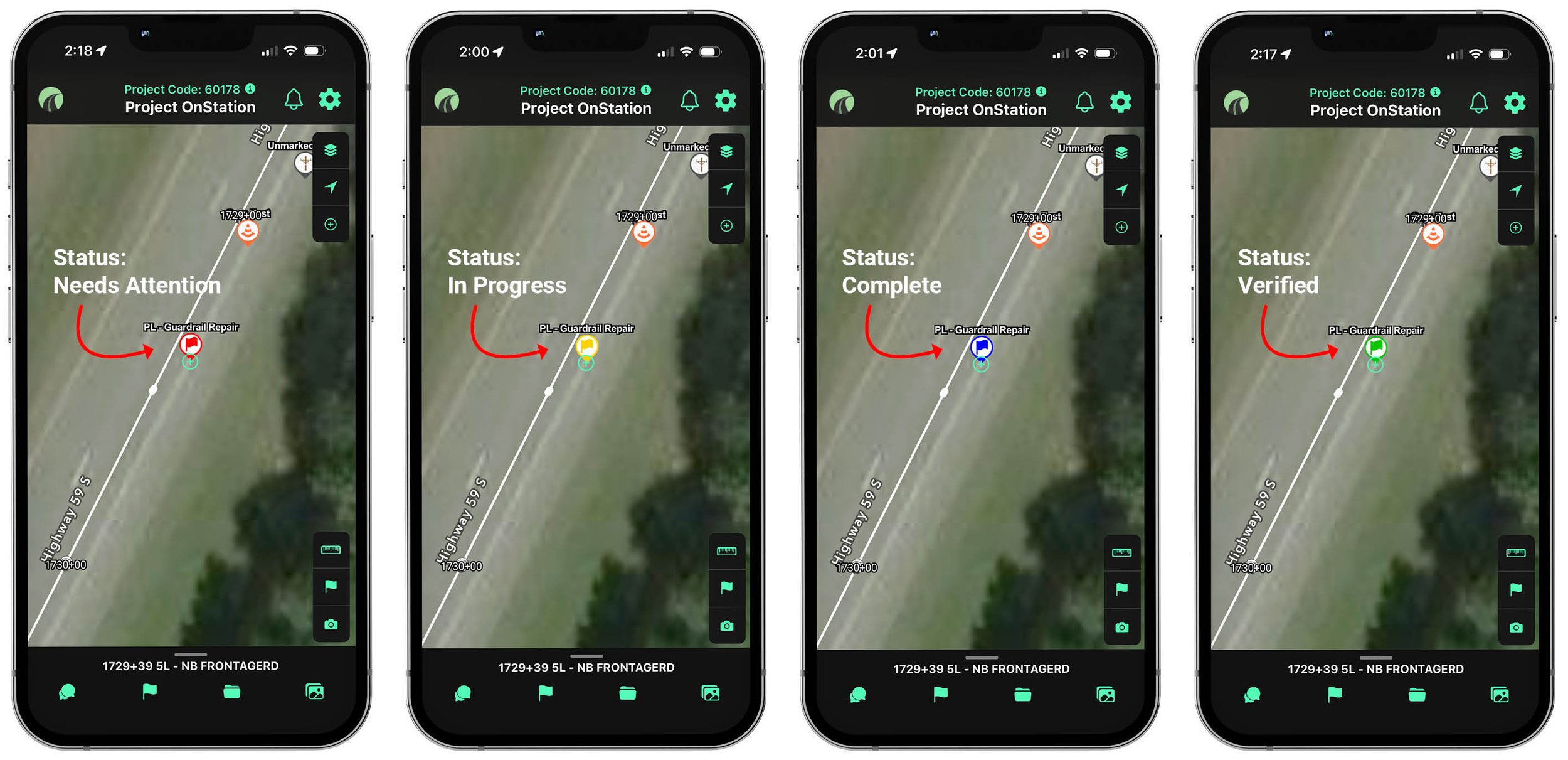
Every punch list item carries a status flag, and the flag color changes automatically as the status changes. One look at the project tells you what’s open, what’s being worked, what’s complete, and what’s been verified, all tied back to the location with a station reference.
-

Needs Attention. The item has been identified and work is required. Setting an item to Needs Attention and sharing it with the contractor notifies them, so nobody has to make a phone call or send a separate email.
-

In Progress. The contractor is working on it. When the status changes to In Progress, the flag automatically updates to yellow.
-

Complete. The work has been completed by the contractor. When the status is updated to Complete, the flag turns blue and the inspector knows they can verify the work.
-

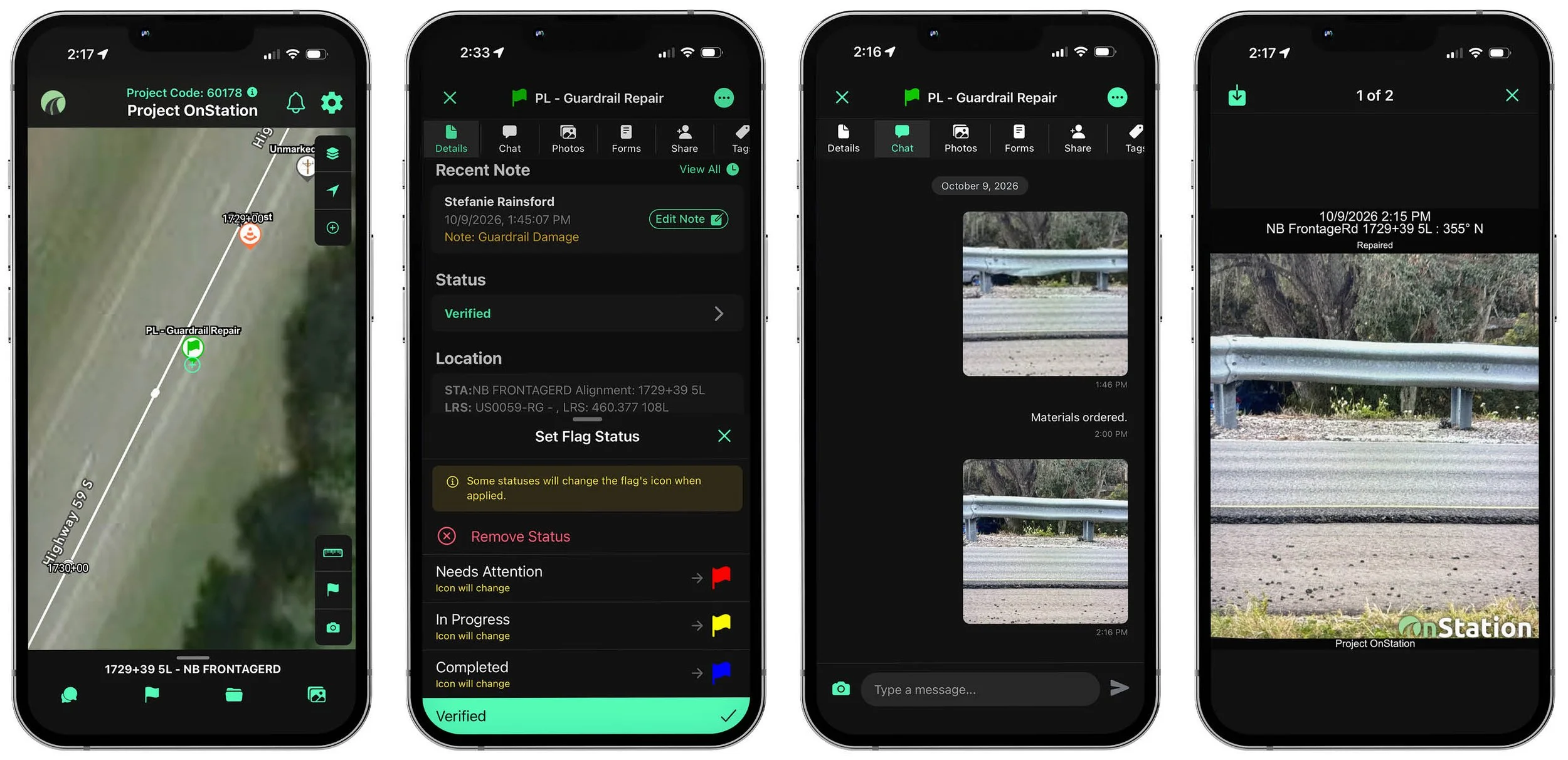
Verified. The inspector visits the jobsite, verifies the work, documents it with photos, and changes the status to Verified. This provides proof of completion for closeout.
Green doesn’t mean “someone says it’s done.” It means the work was finished, verified, and documented, which can be the difference between a long closeout full of disputes and getting paid on time.
Step 2: Share Items with Contractors and Inspectors
Once an item is created, share it with the contractors and inspectors who need to see it. Work whichever way fits the job:
Share as you go. Send each item the moment you create it, so crews can get started on urgent work while you’re still walking the project.
Share in bulk. Build the full punch list first, then share every item at once when the walk is complete.
Either way, the contractor gets the item with its exact station and offset, photos, and notes. They know what the problem is, what needs to be done, and where to go before they ever get in the truck. Contractors, CEI staff, DOTs, and subs all work from the same live stationing data, so there are no mismatched notes or conflicting location references.
Step 3: Receive Completion Updates in Real Time
When the contractor finishes an item, they set it to Complete and add notes and photos of the finished work in the flag’s chat, each stamped with station, date, and time. The flag turns blue, letting the inspector know the item is ready to verify.
No waiting for the next site meeting. No wondering whether a message got passed along. The before and after are documented in the same place, at the same station.
Step 4: Verify the Work and Tie It to Payment
The inspector goes straight to the item’s location, confirms the work, documents it with photos, and changes the status to Verified. The flag turns green, and the item is closed with a full record: where it was, what was wrong, what was done, and who verified it.
Need more detail for your records? Inspectors can also attach an optional inspection form to any punch list item, with fields customized to capture the data specific to your project.
Punch list items can be tied to their pay line item. That connects the work in the field directly to payment, so contractors get paid accurately and on time without digging through notebooks or trying to remember which photo goes with which pay item. OnStation’s Data Portal lets teams generate and share the data needed to support pay items and close out the project with confidence.
That record doesn’t disappear at closeout, either. Months later, if a dispute occurs, anyone can open a flag, see its history, and answer the question of when, or if, the work was completed.
One Punch List Item, Start to Finish
Here’s how a common punch list item moves through OnStation.
Repair guardrail damaged in an accident.
-
Needs Attention. Flag the damaged section of guardrail at its station, attach photos of the damage, note what needs to be repaired, and share it with the contractor.
-
In Progress. The crew sets the status to In Progress, turning the flag yellow, then uses OnStation’s navigation tool to go straight to the location and replace the damaged section.
-
Complete. When the repair is done, the crew changes the status to Complete, which turns the flag blue. The inspector knows the item is ready to be verified, and a quick sort by blue flags shows every item ready for verification so they can plan out their day.
-
Verified. The inspector verifies the work was completed to spec, takes photos of the repair, and changes the status to Verified. The flag records who verified it and when.
The item carries its own location and its own documentation. The contractor doesn’t need a phone call to find it, and the inspector doesn’t need to hunt to verify it.
The same workflow applies to any punch list item: moving a sign, replacing a missing mile marker, sealing a paving joint, trimming branches blocking signage, or removing trees.
The Bottom Line: A Punch List That Defends the Dollar
A punch list is the last step between finished work and final payment. OnStation turns it into one connected workflow:
Flag: every item marked at its exact station and offset, with photos and notes attached.
Share: contractors notified automatically, one item at a time or the whole list at once.
Complete: completion updates with photos, stamped with station, date, and time, and blue flags that show inspectors exactly what’s ready.
Verify: photo documentation, a time-stamped history of every update, and pay line support, all in a record that holds up months after closeout.
The result is fewer phone calls, fewer disputes, and fewer items stuck between “done” and “verified.” Closeout moves faster, pay items are easier to support, and crews spend their time fixing things instead of looking for them.
Contact Us and we’ll show you what a punch list looks like on a project like yours.