
Every type of road construction projectcan be digital.
5,500+ road construction projects are already built and waiting in OnStation. Yours might be one of them. The rest get in fast: self-serve in minutes, engineered submissions in days.
When projects aren't digital, every job is its own problem.
A project that lives in PDFs and CAD files on someone's laptop isn't a project your team can work from. It's a project your team has to figure out, one job at a time. The cost shows up in three places.
Location uncertainty across the portfolio
Every project starts from scratch, and every crew faces the same problem: location uncertainty. Stationing lath is staked and re-staked on every job. Across every project, that uncertainty adds significant risk.
Documentation that doesn't survive a challenge
When the DOT contests a station or an inspector questions a quantity, your defense lives in someone's text thread or screenshot. The work was done, but the proof isn't documented.
No company-wide standard
Field workers use one tool, the office uses another, and DOT uses a third. Each project functions as its own micro-system. When onboarding a new inspector or subcontractor, you need to teach them how this specific job operates, rather than the company's overall procedures.
Your job is on your phone right now.
More than 5,000 projects are already built and waiting in OnStation. If your DOT released it, there's a strong chance we have it. Log in and check. For the projects we haven't built yet, choose the path that fits the project you have in front of you.
Send us your engineered files. We build the project.
This is the longest-running path into OnStation. Send your engineered project files. Our team digitizes the alignment, displays the design layers, locks in the survey coordinate system and scale factor, and hands you back a digital project your whole crew can open. Standard turnaround is two weeks. Urgent jobs can be expedited.
- 2-week standard turnaround, expedite option for time-sensitive jobs
- LandXML alignment files give the fastest path; ALG, DGN, DWG, DXF, KML/KMZ are also supported
- Plan sets, line items, and standard drawings can ride along with the submission
- Project updates flow back in when alignment and design revisions are made mid-project
- Anyone with an OnStation account can submit a project
No alignment files? Define the project area and draw your stationing.
For projects without engineered alignment files, Approximate Stationing lets you draw the project bounds and centerlines directly on a map. OnStation generates approximate stationing from your drawing. This fully self-serve process results in projects ready in minutes.
- Draw project bounds and alignment on the map in the OnStation Portal
- OnStation generates approximate stationing from your drawing
- Set your own start and end station values
- Works for resurfacing, sealcoat, patching, any project where alignment files don't exist
- Self-serve and ready in minutes, not days
Stakes are reference markers. Nobody questions stakes.
The predictable concern with Approximate Stationing is accuracy. The honest answer: reference stationing in OnStation works the same way physical stakes do. A marker, not a live computation. Crews have trusted stakes for a century. The reference here is no different.
Defined Area Projects. The simplest path to digital.
Some projects don't require stationing. For these, draw the project boundaries, and OnStation displays the reference systems relevant to your area: mile markers, LRS, and/or lat/long. Use the same field tools to document the work. No alignment needed.
- Draw project bounds on the map, no alignment drawing needed
- OnStation shows the linear reference systems available for your state
- Same flags, photos, notes, and documentation functionality as any other OnStation project
- Submit and access in minutes
Every project digital means every project does more.
Getting your project in is just the first half. What follows is where every-project-digital truly delivers. It provides your field crew with live stationing, your inspectors with a defensible field log, your engineering team with a clean export to GIS, and your office with a comprehensive project file portfolio.
View the original engineered design alongside a separate, clearly defined record of what your team actually built. Copy a project layer into a Custom Layer, then edit attributes, update metadata, add new elements, or flag issues for documentation. The original design data is preserved. Your as-built record builds spatially, with full attribution, on top of the existing design.
- Edit existing features on the layer (guardrail moved, utility line rerouted, drainage shifted)
- Add new elements that weren't in the original design
- Snap new asset installations to existing features with attribute inheritance
- Associate assets to pay items, tags, work items, and forms
- Edit the pop-up metadata directly on the layer
- Export individual flags or full Custom Layers without exporting the entire project
Custom Layers require a Data license and organizational configuration.
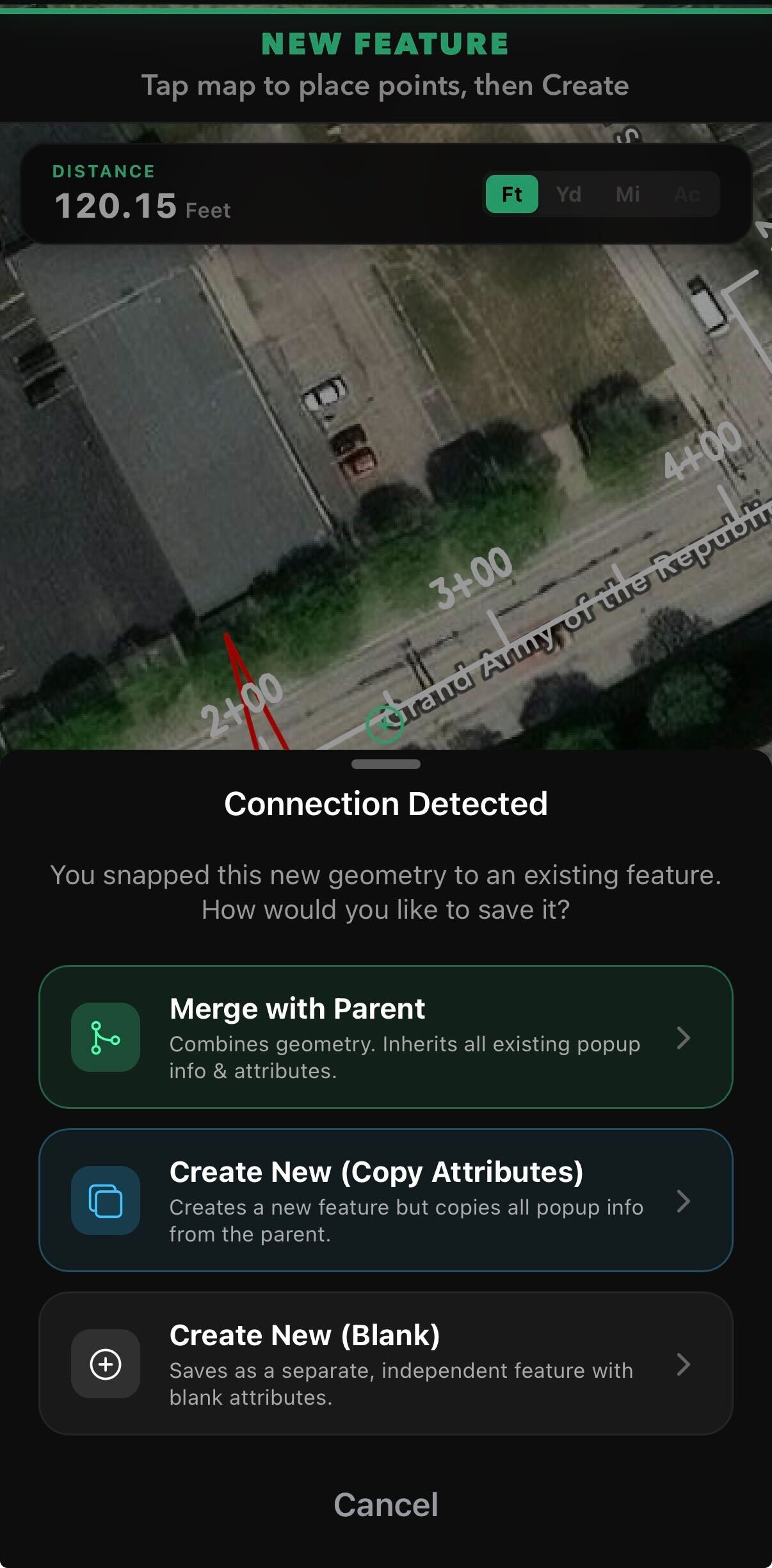
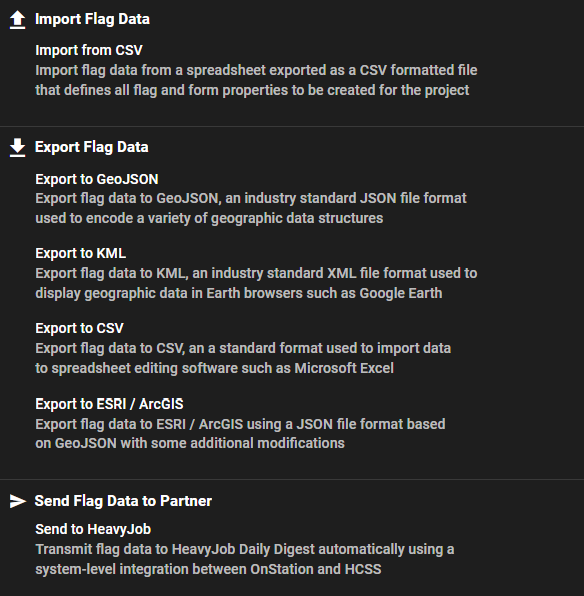
Your project extends beyond OnStation. Field documentation, layers, flagged features, and as-built records all integrate seamlessly with the tools your GIS and engineering teams already use. As a proud member of the Esri Partner Network, OnStation is designed to supply ArcGIS Pro, ArcGIS Online, and Field Maps with location-anchored field data.
- KML and KMZ exports for use in Esri ArcGIS, Civil 3D, OpenRoads, MicroStation, and other CAD platforms
- Flagged features export individually or in bulk, with full attribution
- Field documentation overlays on top of your existing GIS layers
- Custom Layer exports feed asset management and as-built workflows
- Dashboards in ArcGIS Online can visualize live OnStation field data
When you submit a CAD project to OnStation, our team runs your raw engineering files through our proprietary process, producing a highly usable, detailed project file with a clean coordinate system, clean lines, an applied scale factor, and a structured layer set. Until now, those files have stayed inside OnStation. We're now making them available to customers as a separate offering for use in your own GIS workflows.
- Cleaned KML files, built from your CAD submissions
- Coordinate system preserved from the source design
- Suitable for ingestion into Esri, Civil 3D, OpenRoads, Google Earth, or any modern GIS platform
- Available as a separate paid offering when released
The reality of civil design file standardization
Project CAD files don't arrive clean.
We take in design files from agencies across the country, in every format and fidelity. We know what shows up, because we build the projects.
Alignment formats received across a recent submission of 138 projects.
What comes in
What comes out
One digital alignment. Live stationing on any phone or tablet, in the field.
In a sample of project submissions from a single state, alignments arrived in eight different formats. Representative of what we see; the mix shifts by agency and project.
Coordinate Fidelity by Default
Your coordinate systems and datum remain.
State Plane and county zones
Single and multi zone state plane, plus county coordinate systems.
US Survey Foot and Int'l Foot
We honor the foot definition your project was built in.
NAD27 through NAD83(2011)
Horizontal datums matched to the source.
Ground to grid scale factors
Combined and project scale factors applied correctly.
Station equations and breaks
Alignment equations carried through to field stationing.
Reprojection between systems
Move cleanly between zones when a project needs it.
Alignments, stationing, coordinate systems, and discipline layers are handled on our side, not yours.
If you are interested in knowing details on your project design file intelligence, contact our Engineering team to learn what we already know.
Contact UsStakes are reference markers. Nobody questions stakes.
If you are a survey-trained reader of this page, Approximate Stationing probably gave you pause. The honest answer to your concern is straightforward, and it is the same answer that has worked on road construction projects for a century.
Reference stationing works the same way physical stakes do. It is a reference marker, not a live computation tied to engineered alignment geometry. Crews trust stakes because stakes are the way the field has always located itself on a job. When a project doesn't have engineered alignment files, the reference stationing OnStation generates is the digital equivalent. A marker. A reference. The same thing your crew has been working from for decades, now on a phone, with a date and time stamp, and a record of every flag and photo dropped from it.
Live stationing, the kind you get from an engineered alignment submission, is more accurate. Both are useful. The right one depends on the project in front of you.
Read the full breakdown of Reference vs Live StationingFour things change when every project is digital.
The cost of unproven work shows up in your annual margin, even when the work was right. Making every project digital is how you get it back.
Location
Crews that hunt for their location burn hours that come straight off your margin. Live stationing turns that lost time back into work that bills.
Documentation
Weak documentation loses billing disputes and change orders that should have been won. A defensible, date-stamped record defends every dollar you bill.
Collaboration
When your crews, the office, and the agency work from one shared record, you run the kind of project that wins the next award. OnStation users bring it into the bid as a reason to get picked.
Safety
A location-tagged record of hazards flagged and crews warned. Lower liability exposure and a safety program that holds up when something goes wrong.
Every type of road construction project, digitally yours.
5,000+ projects are already built in OnStation. Yours might be one of them. The ones we haven't built yet can be ready within minutes, or within days for engineered file submissions. Build your digital project portfolio today.