


OnStation + TransTech Systems Integration
TransTech Systems is a leading provider of non-nuclear asphalt density testing equipment, used across the U.S. for fast, accurate compaction measurements in the field.
Integration Overview
Manual data entry slows down inspections and increases the risk of errors. With the TransTech PQI 380 and PQI 380+ integration, technicians can either scan a QR code or upload data via USB to instantly transfer compaction measurements into OnStation. This flexible workflow eliminates handwritten logs, reduces transcription errors, and gives CEI teams real-time access to field data—streamlining reporting, improving accuracy, and enabling faster, more informed decisions.
🔥Popular Integration
✔ Trusted by inspectors in the field Used on projects to streamline how density data is captured and verified.
✔ Improves accountability
Automatically links TransTech readings to exact station locations in OnStation, reducing paperwork and disputes.
✔ Improves safety and reduces burnout
Minimizes roadside time and streamlines repetitive tasks to reduce risk, fatigue, and field exposure.
Partner
Categories
Density Gauge | Add-On | Integration
Primary Users
Field Technicians
Density Technicians
Asphalt QC/QA Inspectors
Materials Testing
Technicians
Paving Foremen
DOT Inspectors
Secondary Users
Construction Engineering Inspectors
Project Engineers
Field Supervisors
Quality Control Managers
Project Managers
Requirements
OnStation Subscription Trial Available
TransTech System Conntect Subscription Trial Available
Resources
Webinar: OnStation + TransTech Systems Integration Explained
Integration Setup
Subscribe to TransTech Connect and OnStation
Only users with a paid subscription to both platforms can activate the integration.
OnStation Integration
$1,500/year
Available as an add-on to any OnStation license subscription.
Get PricingTransTech Connect
Starts at $210/month
Includes access to measurement tools, reporting, and OnStation integration support.
Learn MoreRecommendation: When subscribing to OnStation, we highly recommend adding at least one Data License. This allows your team to view all incoming test results in the OnStation Portal, as well as query and export that data for project reporting and QA/QC documentation.
Configure Integration
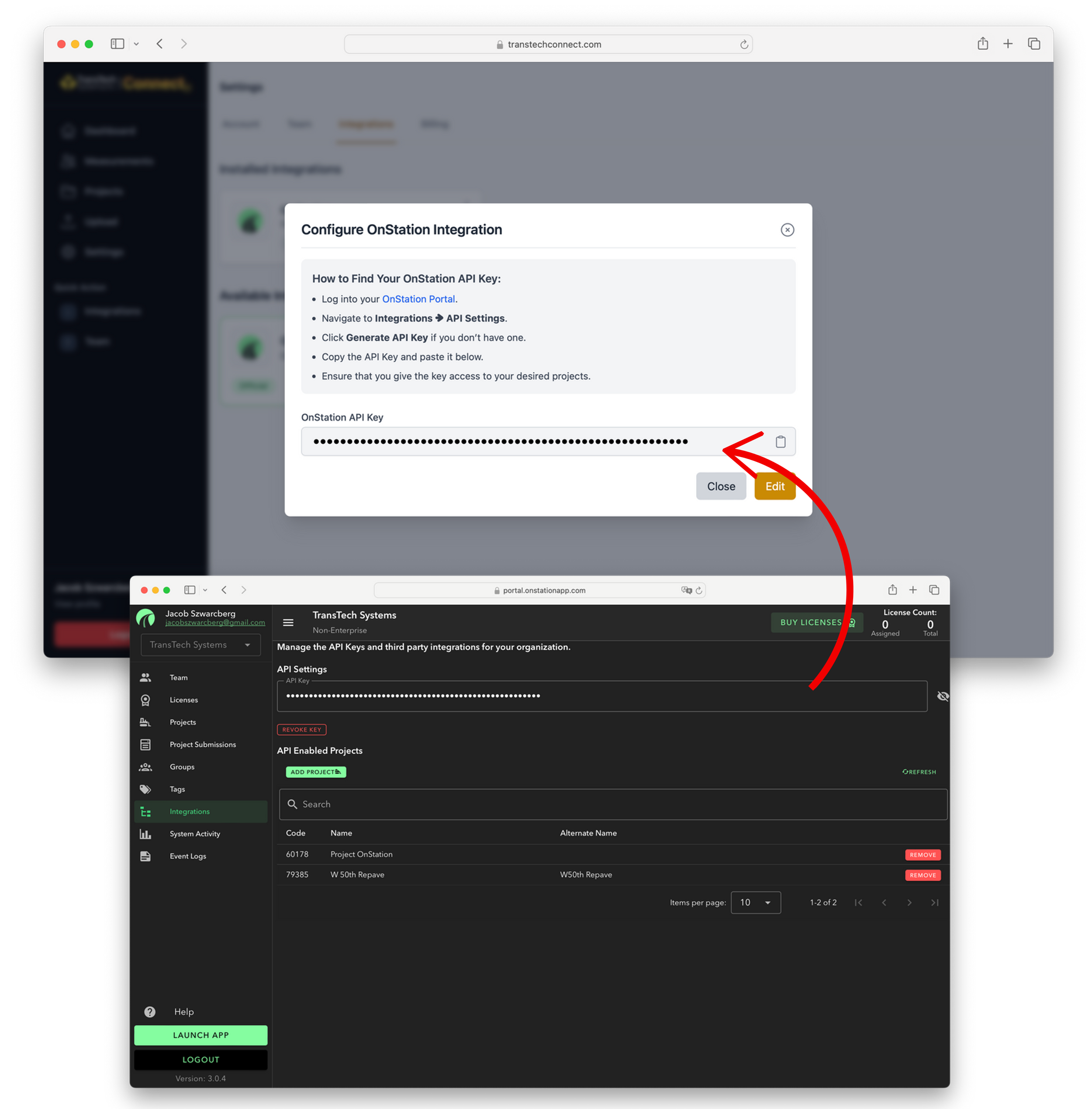
To complete the connection between TransTech Connect and OnStation, you'll need to generate and provide your OnStation API Key.
- Log into your OnStation Portal.
- Navigate to Integrations ➜ API Settings.
- Click Generate API Key if you don’t have one.
- Copy the API Key and paste it into TransTech Connect.
- Ensure the key has access to your desired projects.
It’s a secure code that lets your OnStation account connect with other tools. This step is quick and easy to do directly in the portal—no developer help required.
Send Tests to OnStation
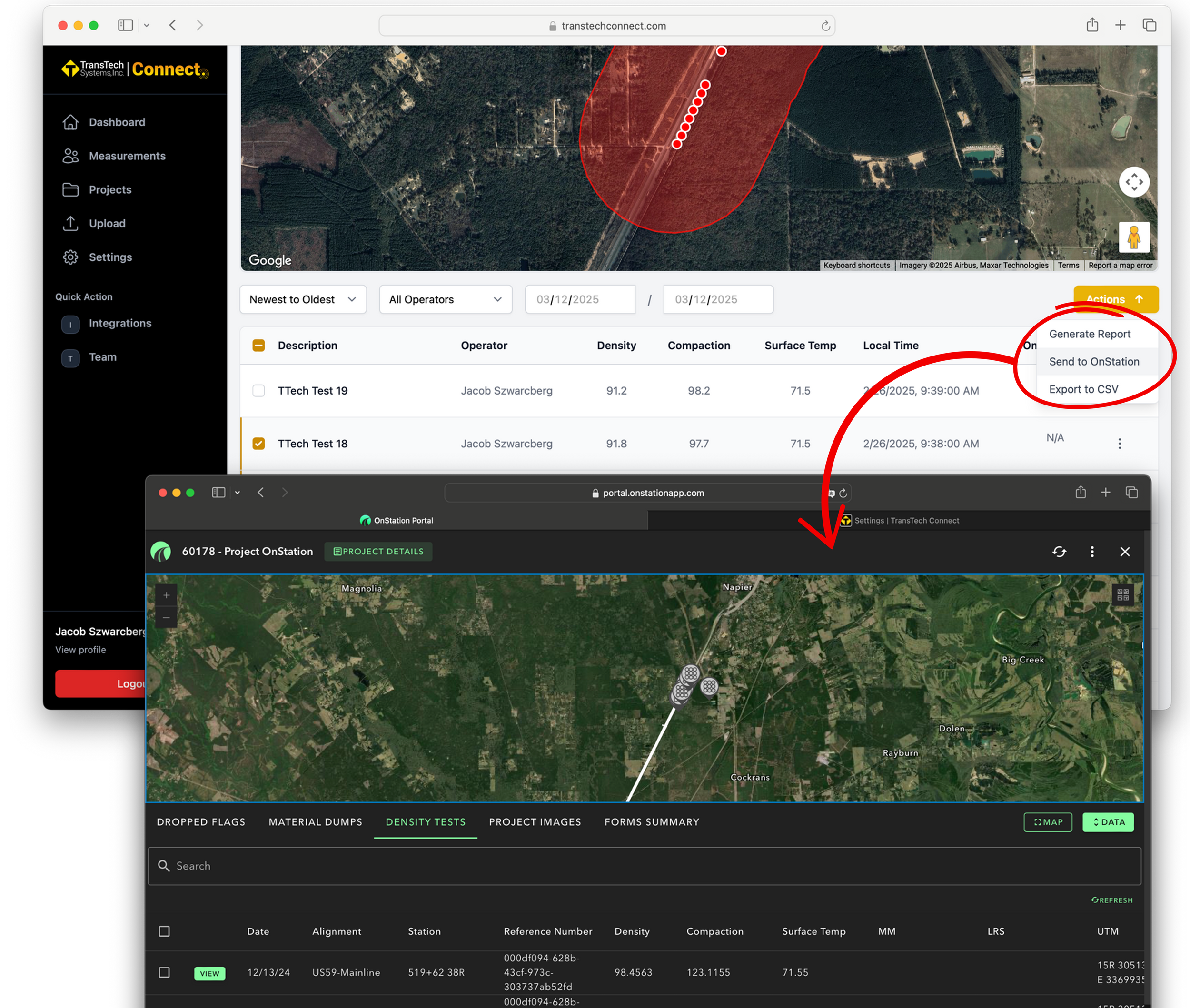
Once your integration is connected, sending test data from TransTech to OnStation only takes a few clicks.
- Open a project in TransTech Connect
- Select Measurements
- Click Actions ➜ Send to OnStation
- The app pulls the Project ID from OnStation
- Confirm the correct project
- Your measurements are sent to OnStation
Shared Data
Stationing
Density Tests


Create Record in Portal
Density Tests
TransTech + OnStation Integration Demo
-
✔
Live WalkthroughSee how digital stationing and density testing work together in the field.
-
⚙
No Developer SetupUp and running in under 10 minutes. No tech team needed.
-
🧠
Real Field BenefitsImprove accuracy, reduce burnout, and make decisions faster.
Book a Time
Choose what works best for you
Schedule Your Demo Now- 📅 30-minute live session
- 📧 Calendar invite included
- 🔒 Private 1-on-1 call